
Visits and tests
Plan your visits, scans and treatment days in one place
Keep chemotherapy days, scans and doctor visits in one place. Get reminders before each one and a ready list of questions for your oncologist.
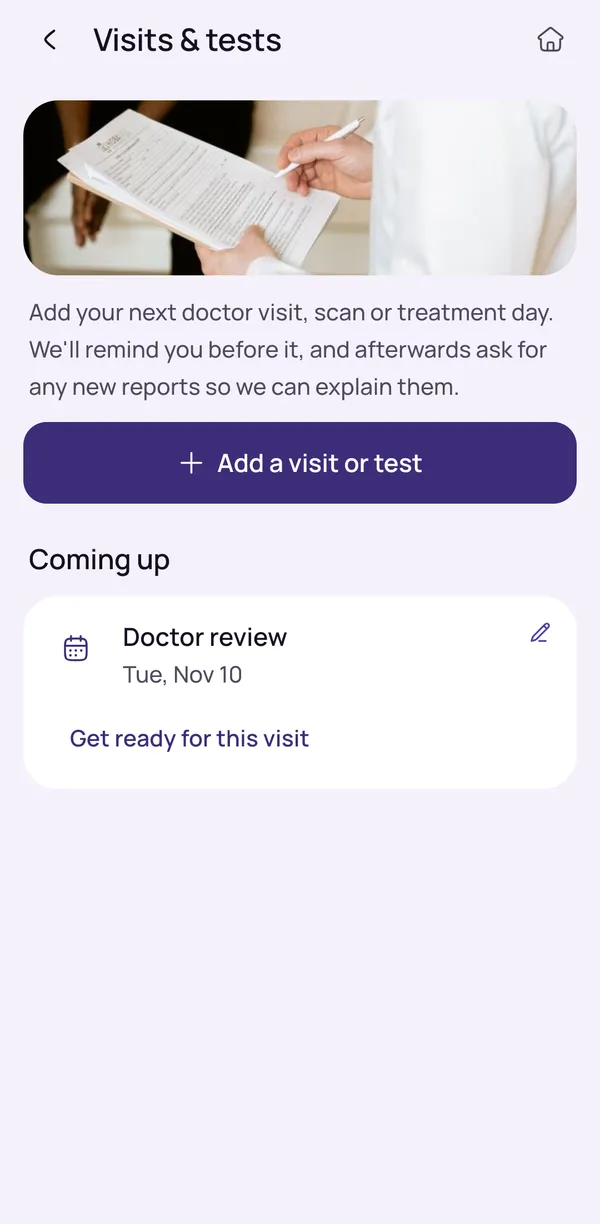
Add a doctor review, scan, treatment day or other visit
Keep track of chemotherapy days, scans and doctor reviews in one place, instead of paper slips and memory. Choose the kind of visit when you add it: a doctor review, a test or scan, a treatment day, or any other visit that matters to you, such as a nutrition appointment or a blood test at a nearby lab.
Treatment days are recorded as visits with a date. The app does not plan chemotherapy cycles or doses, because that is your oncologist's work.
It helps to add each visit as soon as you know the date, and to add the hospital or clinic name in your own words, so the list makes sense to anyone who helps you.
- Doctor review
- Test or scan
- Treatment day
- Any other visit that matters to you
Reminders 3 days before, the day before and that morning
OncoVOIS sends three reminders for each visit you add. The first, three days before, gives you time to arrange travel, a companion and leave from work. The second is a quick check the day before, and the third helps on the morning itself.
Reminders follow the date and time you enter, so check them against the hospital's appointment slip or message. If the hospital moves a date, change it in the app so the reminders stay right.
Medicines have their own reminders, set only for medicines your doctor prescribed. If you are unsure about preparation for a scan or test, such as whether to avoid food or drink beforehand, ask the hospital, because instructions differ from test to test.
- 3 days before
- The day before
- On the morning of the visit
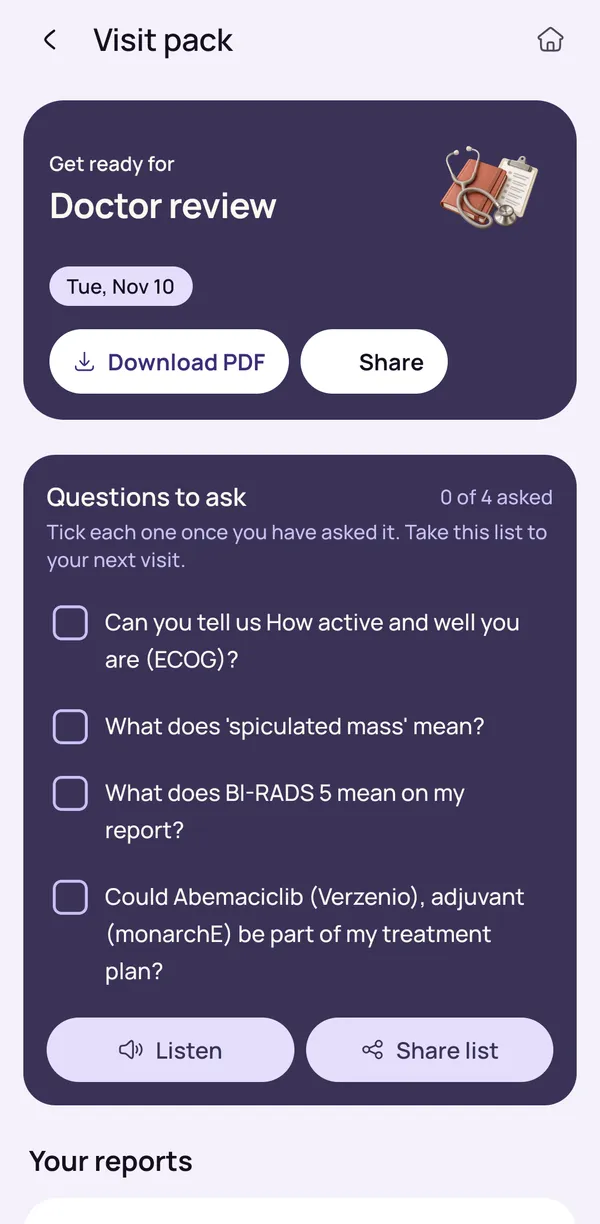
Your visit pack: questions to ask
Appointments can feel rushed, and worry makes it easy to forget what you wanted to ask. A visit pack is a short list of questions for your next visit, and you can add your own. Good questions are often simple, such as what a result means and what happens next.
Share it with family the day before, so everyone knows what matters most to you. Decide who will write down the answers, and tick each question off as it is answered. If something is unclear, ask the oncologist to explain it again in simpler words.
The pack is a memory aid. It does not replace what your doctor tells you.
- Tick each question as it is answered
- Have the questions read aloud
- Download a PDF or share with family
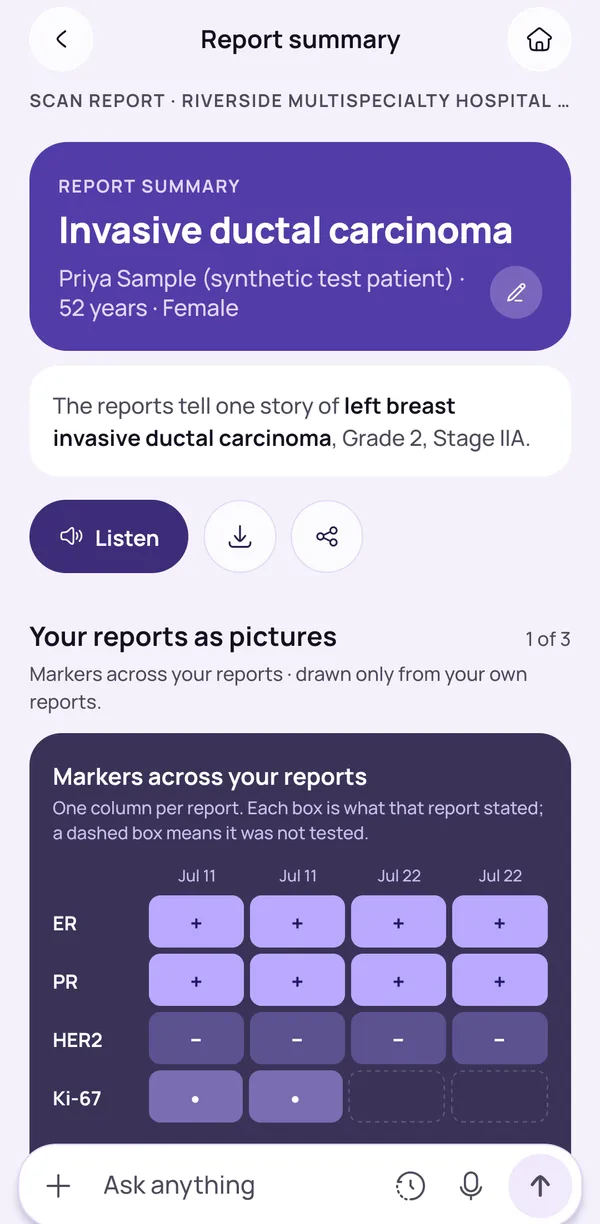
After the visit: add new reports
After a visit, the app asks whether you have new reports, such as a blood test, scan report or doctor's note. You can add them with the camera, photos, a PDF, a Word file or a text file.
Once you check and confirm them, they join your timeline in date order with a summary in plain words you can listen to. Hard terms are explained when you tap them. This helps when the family wants to understand a result before the next conversation with the doctor.
The summary is an explanation, not advice, so take any questions to your oncologist. If a report is not ready yet, you can come back and add it whenever it arrives.
- Nothing is saved until you confirm
- Add a report later if it is not ready yet
Keep reading
Read more
Plain-words guides on this topic, for patients and families.
- Plain-words guideHow to Keep Track of Chemotherapy Days, Doctor Appointments and Follow-Ups in One AppHow to prepare for chemotherapy days, scans and doctor visits: what to note, what to pack, which questions to ask, and how one app keeps it all together.Read the guide
- Plain-words guideQuestions to Ask Your Oncologist: A Checklist for Every VisitA clear checklist of questions to ask your oncologist at the first visit, after a scan and before treatment, with tips for taking notes and bringing family.Read the guide
Frequently asked questions
Can an app keep track of my chemotherapy appointments and scan dates?
Yes. OncoVOIS lets you add visits in one place, so you can keep track of chemotherapy days, scans and doctor reviews without relying on paper slips or memory. It records treatment days as visits. It does not plan chemotherapy cycles or doses, because that is the oncologist's work.
When you add a visit, you choose what kind it is, such as a doctor review, a test or scan, a treatment day or another visit. The dates sit together, so a family member who helps you can see what is coming. After a visit, the app asks whether you have new reports to add, so they can be explained in plain words. Your oncologist and the hospital remain the source for exact dates and timings. If the hospital changes a date, update the visit in the app so the reminders stay right.
How do I remember all my doctor visits, scans and treatment days?
Keeping everything in one place usually helps most. Many families start with a paper diary or phone notes, and these work until dates change or several people are involved. A single list that reminds you before each visit takes some of the pressure off.
In OncoVOIS you can add each doctor review, test or scan, treatment day or other visit, and the app sends reminders for it. Then you do not have to carry every date in your head while you are also caring for someone who is unwell. Whatever you use, it helps to write down the hospital's exact reporting time and where to go, and to confirm any change by phone with the hospital. Ask the care team which visits and tests are coming next, so the list in the app matches what the oncologist has planned. If dates feel confusing, ask the hospital to write them down for you too.
When will OncoVOIS remind me about a visit?
OncoVOIS sends three reminders for each visit you add: three days before, the day before, and on the morning of the visit. The first gives you time to arrange travel, a companion and leave from work. The second is a quick check before the day. The third helps on the day itself.
These reminders depend on the date and time you enter, so check them against the hospital's appointment slip or message. If the hospital moves a date, change it in the app. Reminders are for visits, such as a doctor review, a test or scan or a treatment day. Medicines have their own reminders, which are set only for medicines your doctor has prescribed. If you are unsure about preparation for a particular scan or test, such as whether to avoid food or drink beforehand, ask the hospital, because instructions differ from test to test.
What kinds of visits can I add in the app?
You can add a doctor review, a test or scan, a treatment day, or any other visit that matters to you. Other visits might include a visit to a dental clinic, a nutrition appointment, a physiotherapy session or a blood test at a nearby lab. You decide what goes in.
A treatment day is recorded as a visit with a date. The app does not work out cycles, intervals or doses, and it will not suggest changes to a treatment. Those decisions belong to your oncologist. It helps to add each visit as soon as you know the date, and to add the hospital or clinic name in your own words, so the list makes sense to anyone who helps you. After the visit, the app asks whether you have new reports. You can photograph or upload them so they sit in your timeline with the rest.
Does the app plan my chemotherapy cycles or doses?
No. OncoVOIS keeps track of chemotherapy days as visits, but it does not plan chemotherapy cycles, work out intervals, or suggest doses. Your oncologist decides the plan, including how often treatment happens, and may change it after blood tests, scans or how you are feeling.
What the app does is help you remember the dates your team gives you, remind you in time, and gather your questions for the next visit. If the plan changes, update the visit date so your reminders match. Medicines are handled the same way: reminders are only for medicines your doctor prescribed, and the app never proposes a dose or a change. If you are unsure about any part of the plan, such as when the next treatment is due or what to do if a date is missed, ask your oncologist or the hospital team directly and write down what they say.
What is a visit pack and how can it help at my oncologist appointment?
A visit pack is a short list of questions for your next visit. You can tick each question off as it is answered, have it read aloud, download it as a PDF, or share it with family. It helps because appointments can feel rushed and worry makes it easy to forget what you wanted to ask.
Good questions are often simple, such as what a result means, what happens next, and what to do if symptoms change. You can add your own. If a family member is joining the visit, sharing the pack beforehand means everyone knows what matters most to you. During the visit, jot down the answers next to each question. If something is unclear, ask the oncologist to explain it again in simpler words. The pack is a memory aid. It does not replace what your doctor tells you.
What happens in the app after a visit?
After a visit, OncoVOIS asks whether you have any new reports from it, such as a blood test, scan report or a doctor's note. You can add them with the camera, photos, a PDF, a Word file or a text file. The app reads the report and shows you what it found, and nothing is saved until you check and confirm it.
Once saved, the report joins your timeline in date order and gets a summary in plain words, with hard terms explained when you tap them. You can have the summary read aloud. This helps when the family wants to understand a result before the next conversation with the doctor. The summary is an explanation, not advice, so take any questions it raises to your oncologist. If a report is not ready yet, you can come back and add it later whenever it arrives.
Can I share my questions with my family before a visit?
Yes. A visit pack can be shared with family, and it can also be downloaded as a PDF. That helps when several relatives want to take part, or when someone who cannot come to the hospital still wants to know what will be asked.
A useful habit is to look at the list together a day before the visit, add anything that is worrying people, and decide who will write down the answers. If your family is spread across cities, a shared PDF means everyone is working from the same page. You can also have the questions read aloud, which can help older family members who find small text hard to read. During the appointment, one person can tick off questions as they are answered. Afterwards, add any new reports so the explanations are ready for the next conversation. The oncologist decides what is right for your situation.
What should I do if I feel very unwell before my appointment?
Do not wait for the app or for the appointment. If you or the person you care for has urgent symptoms, contact the hospital or treating team straight away. For an emergency, call 112, or call an ambulance on 108. Emergency numbers are shown first in OncoVOIS for this reason.
The care team usually gives families a number to call during treatment, and it is wise to keep it written down and saved on the phone. Symptoms that worry families often include a high temperature, trouble breathing, bleeding that will not stop or being unable to drink fluids. Your oncologist can tell you exactly which symptoms need a call in your case. Reminders in the app are only for planning ahead. They are not a way to decide whether something is serious. When in doubt, call the hospital first and tell them you are on treatment.
This page is general information, not medical advice. OncoVOIS explains and helps you prepare; your oncologist decides about your care.