
Medical records app
Medical Records App for Cancer Patients: Every Report in One Place
“Cancer brings a pile of papers: biopsy reports, scans, blood tests and discharge notes, often from more than one hospital. OncoVOIS is a medical records app for cancer patients and families that turns those papers into one simple timeline on your phone. Take a photo or upload a file, check what the app read, and each report is saved in date order with a summary in plain words. Your oncologist still decides about tests and treatment.”
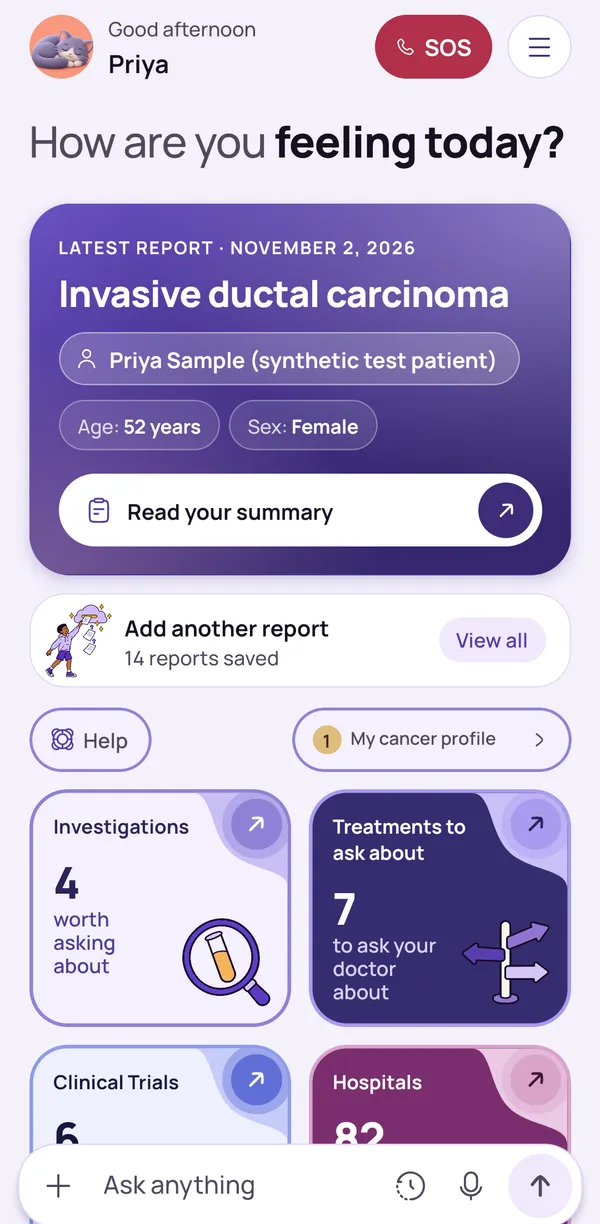
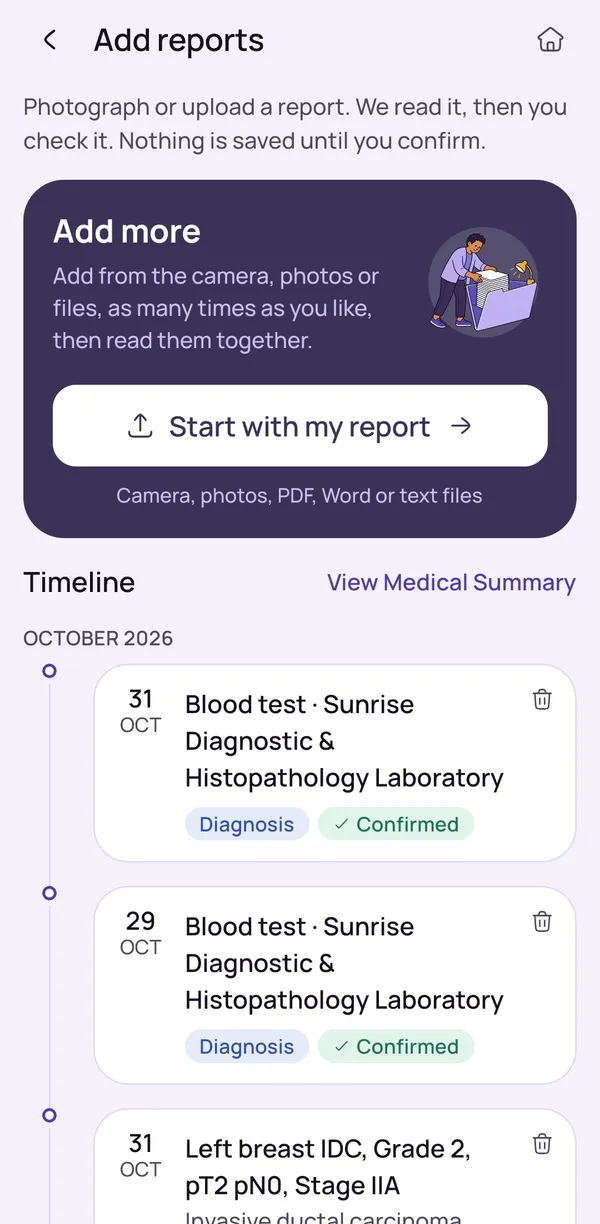
How to Add Cancer Reports to the App
Open the app and add each report the way that suits you. You can use the camera on a printed page, choose photos already on your phone, or pick a PDF, Word or text file. Biopsy reports, scan reports, blood tests, discharge summaries and treatment plans can all go in.
Old and new reports can go in together, so you can start with one report and add the rest when you are ready. There is no need to sort them first.
Clear photos help. Place the page flat in good light, keep the whole page in the picture and hold the phone steady. If a report has several pages, add every page. Keep the paper originals too, because your hospital may ask to see them.
- Add reports by photo, PDF or Word file
- Biopsy, scan, blood test and discharge reports
- Place the page flat, in good light, with every page included
- Start with one report and add the rest later
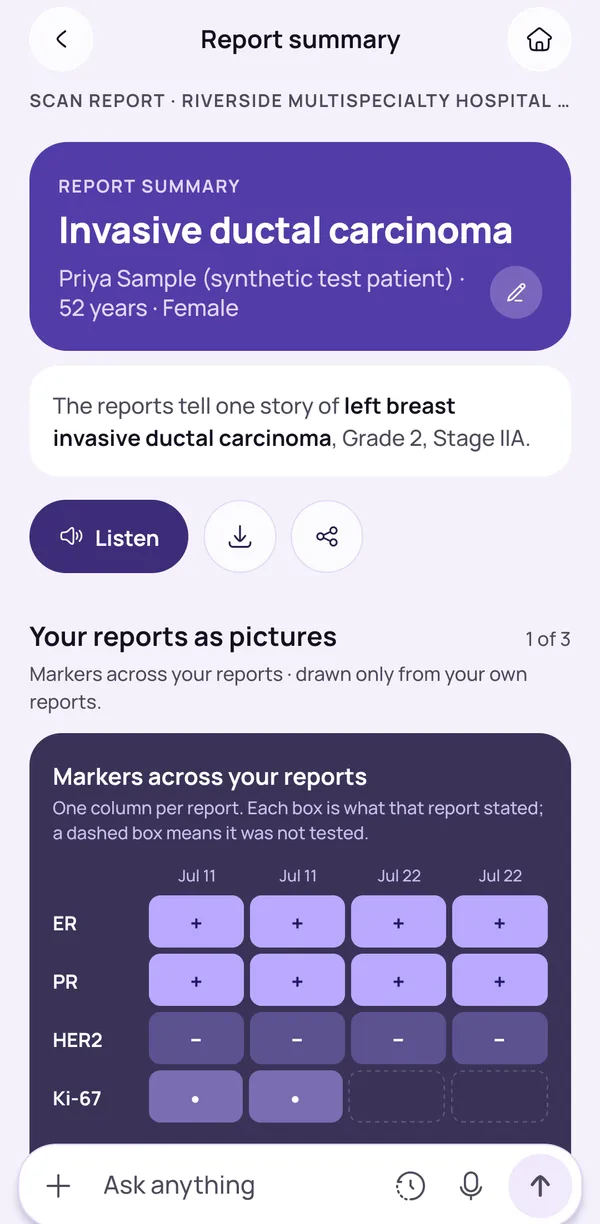
You Check Every Report Before It Is Saved
After you add a report, the app shows you what it found. Nothing is saved until you confirm. Compare names, dates and numbers with the paper, because a blurred photo or faint print can be misread.
If something does not match, do not confirm it, and add a clearer photo or file instead. Take your time. Your timeline and summaries are built from the reports you confirmed, so checking once helps everything that follows.
The app helps you keep your papers in order and understand the words, but it cannot replace the original report your hospital gave you. If something in a report worries you, speak to your oncologist or your hospital team.
- Compare names, dates and numbers with the paper
- If something does not match, do not confirm it
- Add a clearer photo or file instead
- If a report has several pages, add every page before you confirm
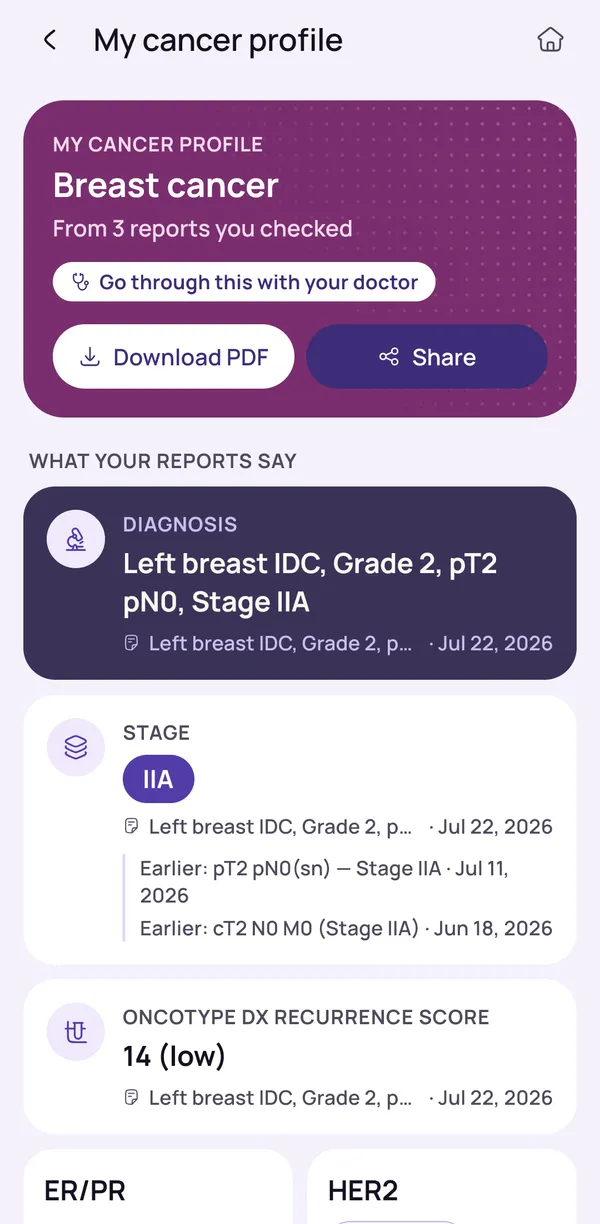
Share Medical Reports with Your Doctor and Family
When a doctor in another city or a relative abroad needs to see your reports, you don’t have to send dozens of blurry photos. Our medical records app for cancer patients lets you download or share a plain-words summary of any report, or your cancer profile, a single page built from all your reports. Share only with people you trust, and always take the original reports to your appointment, since your oncologist will want to see them.
- Share a report summary
- Share your cancer profile for a second opinion
- Save your cancer profile as a PDF for a relative in another city
- Share only with people you trust, and take the original reports to your visit
Download or delete at any time
Your information stays in your hands: you can download a copy of your data, or delete all of it from the app, at any time. Both options are available from the app itself.
A family may want to remove reports when a loved one asks, or when they no longer want the records on the phone. Deleting your data in the app does not change the records your hospital holds, so keep your paper originals too.
The first reports can be read without an account, and signing in is needed to keep your reports saved. The privacy policy explains what is kept and why, so it is worth reading before you add reports. It is your information, and the choice to keep it or remove it is yours.
- Download a copy of your data
- Delete all your data from the app
- Sign in to keep your reports saved
- Deleting data from the app does not change your hospital’s records
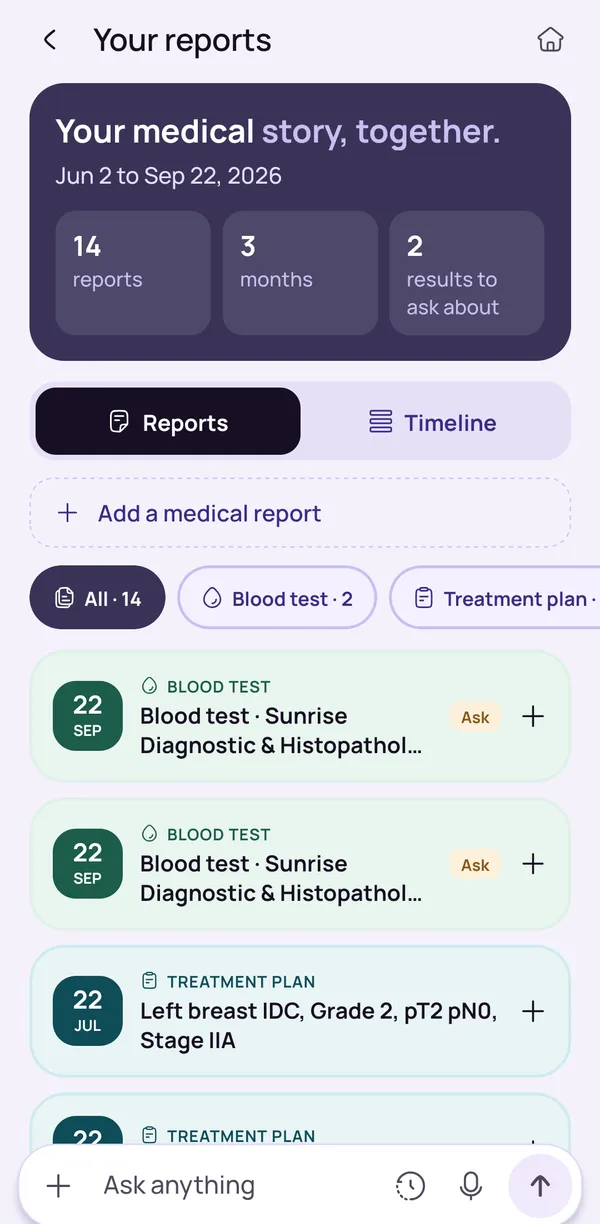
All Your Cancer Medical Records in One Timeline
Every report you confirm joins one timeline, in date order. You can filter it by type, such as blood test or treatment plan, to see only those reports. You do not have to search through folders and bags of paper.
Before a visit, one screen shows what has happened and in what order: the biopsy, the scans, the blood tests and the treatment so far. Reports from several hospitals and laboratories sit together.
Each report also has a short summary in plain words, with hard words explained, and a Listen button reads it aloud. The timeline only shows the reports you confirmed, so keep adding new ones after each visit. When you notice something you want to ask about, write it down for your oncologist.
- Sorted by date and by type
- Each report has a plain-words summary
- A Listen button reads the summary aloud
- Reports from different hospitals and labs sit together in one place
Who This Medical Records App Is For
OncoVOIS is built for anyone who has ever stood in a hospital corridor searching through a bag of papers for one report. Patients use it to keep their records in order and to understand their reports in simple words before each visit. Caregivers often carry the heaviest paperwork. If you are looking after a parent or spouse, the app gives you one place for every biopsy, scan, and blood test, so you can answer the doctor’s questions with confidence.
Families living in another city or abroad can see the same summaries and cancer profile you share with them, so everyone stays informed without endless phone calls.
- Patients who want their reports in order and explained in simple words
- Caregivers looking after a parent or spouse
- Family members in another city or abroad who want to stay informed
- Patients seeing more than one hospital or planning a second opinion
A Medical Records App vs Paper Files, WhatsApp Photos and Google Drive
Most families start with what they already have: a plastic folder of papers, photos in a WhatsApp chat, or files in Google Drive. Each method is somewhat effective. WhatsApp photos get lost in long chats, and Drive folders depend on how carefully someone named each file. The trouble starts when reports pile up across hospitals and months, and you need one result quickly.
Keep your paper originals, since hospitals may ask for them. A medical records app for cancer patients doesn’t replace those papers. It makes them easier to find, understand, and share.
- Reports sort themselves by date, with no folders to manage
- Find any report in seconds instead of scrolling through chats
- Every report comes with a summary in plain words
- Share one cancer profile instead of dozens of separate files
Keep reading
Read more
Plain-words guides on this topic, for patients and families.
Frequently asked questions
Is there a medical records app for cancer patients in India?
Yes. OncoVOIS is an Android app, available on Google Play, made for cancer patients and families in India. It keeps your reports together in one place, so you do not have to search through paper files and loose photos before every visit.
You can add a biopsy report, a scan report, blood tests, a discharge summary or a treatment plan. The app reads each one and shows you what it found, and you check it before anything is saved. Your reports then sit in one timeline in date order. Each report also gets a summary in plain words, and a Listen button can read it aloud. OncoVOIS works alongside your oncologist. It helps you keep your papers in order and understand the words, but it does not replace medical advice. Your oncologist decides about tests and treatment. You can start with just one report and add the rest when you are ready.
How do I store all my cancer medical reports on my phone?
Open the app, add each report, check what it found and confirm it. Once you confirm, the report is saved and joins your other reports in one timeline. This is a simple way to store medical records online without sorting folders by hand.
You can add a report with the camera, with photos already on your phone, or with a PDF, a Word file or a text file. Old and new reports can go in together, such as biopsy reports, scan reports, blood tests and discharge notes. Each report is shown by date and by type, for example blood test or treatment plan, so you can find it again later. Nothing is saved until you confirm it, and signing in is needed to keep your reports saved. Keep the paper originals as well, because your hospital may ask to see them. If you are unsure which copies to keep, ask your hospital's help desk.
Can I add a medical report by taking a photo with my phone?
Yes. You can use the camera to photograph a printed report, or choose photos that are already on your phone. The app reads the page and shows you what it found. You then check it, and only after you confirm is anything saved.
Clear photos help. Place the page flat in good light, keep the whole page in the picture, and hold the phone steady so the words are not blurred. If a report has several pages, add every page. Please compare what is on the screen with the paper, especially names, dates and numbers, because a faint print or a shadow can be misread. If you already have the report as a PDF, a Word file or a text file, you can add that instead of a photo. A photo is only your own copy, so keep the paper report too and take it to your oncologist.
Is this medical records app free to use?
OncoVOIS is free to start. You can install it from Google Play and begin adding your first reports without making an account, so you can see how it works on your own papers before deciding anything else.
The first reports can be read without an account. To keep your reports saved, so that they are still there the next time you open the app, you need to sign in. After you confirm a report, it joins your timeline with the others, and you can read its summary in plain words or listen to it. You can also download a copy of your data or delete all of it from the app at any time. The privacy policy explains what is kept and why, and it is worth reading before you add reports. OncoVOIS works alongside your oncologist and never in place of one.
Do I have to check what the app read from my report?
Yes. After you add a report, the app shows you what it found, and you check it against the paper. Nothing is saved until you confirm. This matters because a blurred photo or a faint print can be misread, and a small mistake in a number or a date should not end up in your records.
Take your time over names, dates and numbers. If something does not match the paper, do not confirm it. Add a clearer photo or file instead. Your timeline and summaries are built from the reports you confirmed, so checking once helps everything that follows. The app is a helper for keeping your papers in order and understanding the words, and it cannot replace the original report your hospital gave you. If something in a report worries you, speak to your oncologist or your hospital team. If you have urgent symptoms, call your hospital or 112 (ambulance 108) and do not wait for the app.
Do I need to make an account to start using the app?
Not at the start. The first reports can be read without making an account, so you can try the app with a report in your hand. To keep your reports saved, so that your timeline is there next time, you need to sign in.
You choose when to sign in. If you are helping a parent or another family member, think about which account the family will use, so that all the records stay in one place and everyone knows where to look. Signing in is what lets the app remember your confirmed reports from one visit to the next. At any time you can download a copy of your data, or delete all your data from the app. The privacy policy explains what is kept and why, so please read it before adding reports. The app is free to start, and it works alongside your oncologist, who remains in charge of your care.
Can I delete all my reports and data from the app?
Yes. A person can delete all their data from the app at any time. You can also download a copy of your data first, if you would like to keep one. Both options are available from the app itself.
A family may want to remove reports when a loved one asks, or when they no longer want the records on the phone. Deleting your data in the app does not change the records your hospital holds, because those belong to the hospital and are separate. Keep your paper originals and any copies the hospital has given you. The privacy policy explains what the app keeps and why, so it is the place to read the details. If you are not sure what deleting will remove, read the policy first or ask the CancerFax team before you decide. It is your information, and the choice to keep it or remove it is yours.
Can I share my reports or summaries with family or my doctor?
Yes, in part. The summary of a report can be downloaded or shared, and so can the cancer profile, which is a single page built from all your reports and can be saved as a PDF. This helps a family member in another city see the same information you see.
Share what your oncologist asks for, and take the original reports to the visit too, because a summary is a plain-words explanation and not the hospital's own report. Before you share, read the summary yourself. Think about who will receive the file, since medical papers are private, and send them only to people you trust. If a relative reads a summary and feels worried, remind them that it explains the words in the report and cannot say what the result means for you. Only your oncologist can explain that, because they know your whole case.
How does the timeline show my medical reports?
Your reports appear in one timeline in date order, so you do not have to search through folders. You can filter the timeline by type, for example blood test or treatment plan, to see only those reports.
Before a visit, you can open one screen and see what has happened and in what order: the biopsy, the scans, the blood tests and the treatment so far. If you have reports from several hospitals and laboratories, they sit together instead of in separate bags and files. Each report also has a short summary in plain words, with hard words explained, and a Listen button reads it aloud. When you notice something you want to ask about, write it down for your oncologist. The timeline only shows the reports you confirmed, so keep adding new ones after each visit. It helps you stay organised, and your oncologist explains what the reports mean.
This page is general information, not medical advice. OncoVOIS explains and helps you prepare; your oncologist decides about your care.