
Medicine reminders
Never miss a prescribed cancer medicine
Gentle reminders for the cancer medicines your doctor prescribed, with a sound you choose and a simple daily tick list, so no dose is forgotten.
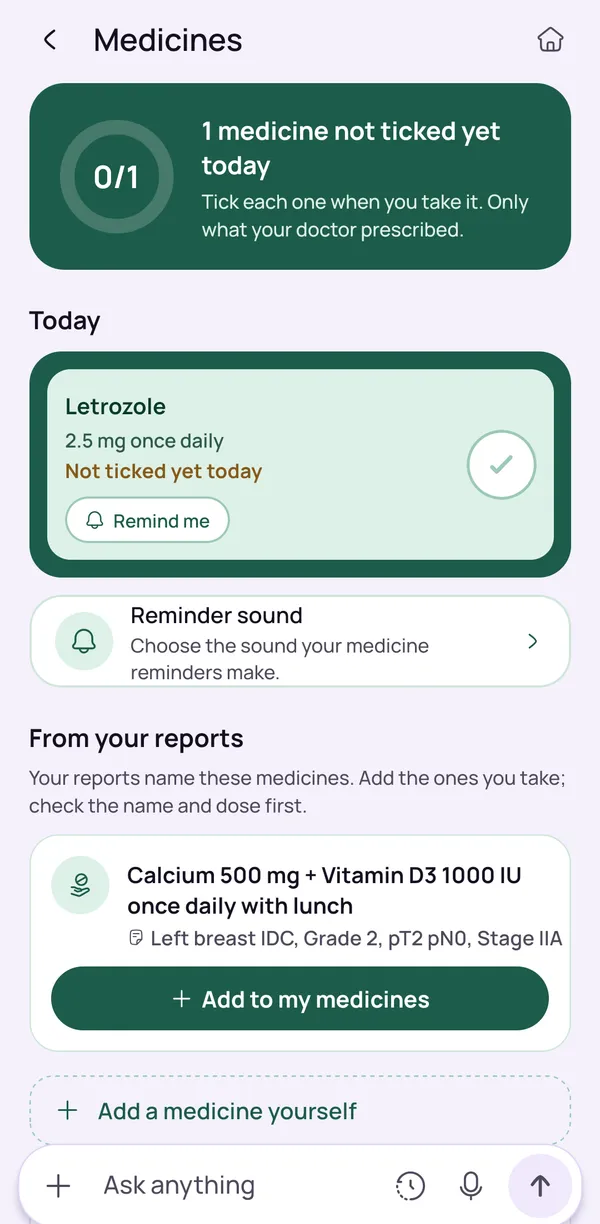
Reminders for prescribed medicines only
OncoVOIS reminds you about the medicines your doctor prescribed, and nothing else. It does not tell you what to take, and it is not meant for medicines you have chosen yourself.
Keep your prescription beside you when you set up reminders, and compare the screen with the paper. This keeps your reminders matched to your treatment plan. If you are unsure whether a medicine is still part of your treatment, ask your oncologist or pharmacist.
Tell your care team too about anything else you take, including home or herbal remedies, so that they have the full picture. Reminders help you follow the plan your care team gave you. They do not replace your prescription.
- Only medicines your doctor prescribed
- Check each one against your prescription
- Tell your care team about home or herbal remedies
Choose your reminder sound
You can choose the sound for your reminders. Pick one you will notice and that does not upset you, because you may hear it every day during treatment. Some families choose a different sound for medicines than for other alarms, so that it stands out.
A reminder is only helpful if you hear it. Check your phone's volume and any silent or Do Not Disturb settings, and keep the phone somewhere you can hear it. If an older family member uses the phone, try the sound together when you set it up.
The sound is only a prompt. It does not tell you how much to take, so keep your prescription close and ask your care team if anything is unclear.
- Pick a sound you will notice
- Check volume and Do Not Disturb settings
- Try it together with older family members
Tick each dose as you take it
A daily tick list shows the medicines you set up for the day. Tick each dose straight after you take it, and you have a simple record of what is done and what is left.
It is easy to wonder later whether a tablet was taken, especially when you are tired or unwell. A quick look at the list can answer that without guesswork. If you are still unsure whether a dose was taken, do not guess. Ask your care team or hospital pharmacist and tell them what happened.
The tick list is your own record, so it helps to show it to your oncologist when you talk about how treatment is going. It does not suggest what to take or change.
- One list for the day
- A quick check when you are tired
- Show it to your oncologist at visits
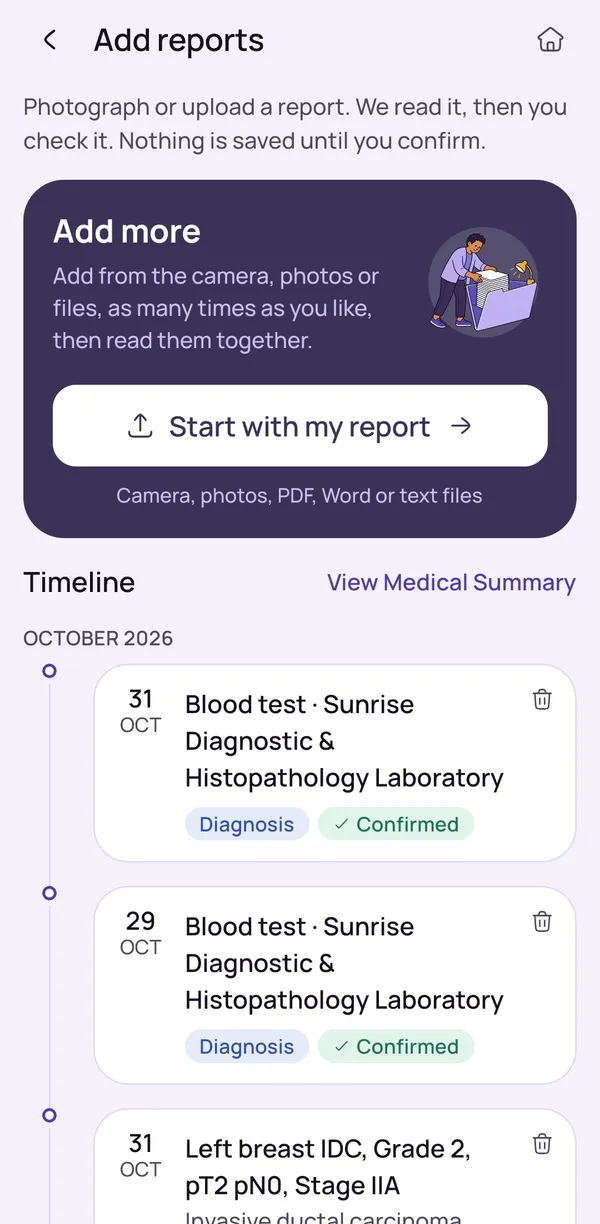
Add medicines from your reports, after you confirm
The app can read medicines named in your reports, such as a discharge summary or treatment plan. You add the report with the camera, a photo, a PDF, a Word file or a text file, and the app shows what it found. Medicines are added to your reminders only after you confirm them.
A report may list medicines that were stopped, changed or only mentioned in passing, so check each one against your latest prescription and leave out anything you are unsure about.
If something does not look right, ask your oncologist or pharmacist. The app will not suggest a medicine that is not in your reports, and it will not tell you how much to take.
- Add reports by camera, photo, PDF, Word or text file
- Nothing is saved until you say so
- Check each medicine against your latest prescription
We never suggest doses
OncoVOIS never suggests doses or changes to your medicines. It does not diagnose or recommend treatment, and your oncologist decides what to take, how much and when. The right plan depends on your cancer, your treatment and your health.
A reminder only tells you that it is time. It cannot know whether your plan has changed or whether a medicine should be taken with food. If a reminder does not match what your doctor or pharmacist said, follow your care team, not the phone. The same applies if you have side effects or run low on a medicine.
Never change or stop a medicine on your own. If you feel very unwell, call your hospital or 112 (ambulance 108).
- No dose suggestions, ever
- Follow your care team, not the phone
- Ask for your instructions in writing if you can
Keep reading
Read more
Plain-words guides on this topic, for patients and families.
- Plain-words guideHow Smart Medicine Reminders Help Cancer Patients Follow Their Treatment SchedulePractical tips for taking oral chemotherapy and other cancer medicines on schedule, and how reminders help families share the load.Read the guide
- Plain-words guideOral Chemotherapy Explained: What It Is and What to Ask Your Care TeamWhat oral chemotherapy is, how it differs from drip chemotherapy, why timing matters, common side effects to report and what to ask your care team.Read the guide
Frequently asked questions
Is there a free medicine reminder app for cancer medicines on Android?
OncoVOIS is an Android app on Google Play, made for families in India, and it is free to start. One part of it is medicine reminders, for the medicines your doctor prescribed.
You choose a reminder sound and use a daily tick list to mark each dose as you take it. It is made for families who want reminders that are simple to use. The app is a cancer support companion, so the same app can also explain your reports in plain words, answer your questions and keep your visits in one place. Reminders are meant to help you follow the plan your care team gave you. They do not replace your prescription, your oncologist or your pharmacist. If you are not sure about anything on your prescription, ask your care team before you set a reminder. The app never decides which medicine you should take or when.
Which medicines can I set reminders for in OncoVOIS?
Reminders are only for medicines your doctor has prescribed. The app is not meant for medicines you have chosen yourself, and it does not tell you what to take.
If a medicine is named in one of your reports, such as a discharge summary or a treatment plan, it can be added to your reminders, but only after you confirm it. Keep your prescription beside you when you set things up, and compare what you see on the screen with the paper. This keeps your reminders matched to your treatment plan. Reports can be old, and a medicine mentioned in one may have been stopped or changed since. If you are unsure whether a medicine is still part of your treatment, ask your oncologist or pharmacist. Tell your care team too about anything else you take, including home or herbal remedies, so that they have the full picture.
Can I choose the reminder sound in the medicine reminder app?
Yes. OncoVOIS lets you choose the sound for your reminders. It is worth picking one that you will notice and that does not upset you, because you may hear it every day during treatment.
A reminder is only helpful if you hear it. So also check your phone's own volume and any silent or Do Not Disturb settings, and keep the phone somewhere you can hear it. Some families choose a different sound for medicines than for other alarms, so that it stands out. If an older family member uses the phone, try the sound together at the time you set it up. The sound is only a prompt. It does not tell you how much to take, and it does not replace your doctor's instructions, so keep your prescription close and ask your care team if anything is unclear.
How does the daily tick list work for my medicines?
The daily tick list shows the medicines you set up for the day. When you take a dose, you tick it. Ticking straight after you take it gives you a simple record of what is done and what is still left for the day.
This matters because it is easy to wonder later whether a tablet was taken, especially when you are tired or unwell. A quick look at the list can answer that question without guesswork. If you are still unsure whether you took a dose, do not guess. Contact your care team or hospital pharmacist and tell them what happened. The tick list is for your own tracking, so it helps to show it to your oncologist when you talk about how the treatment is going. It is a way of keeping track, and it does not suggest what to take or change.
Can OncoVOIS add medicines from my reports automatically?
The app can read medicines named in your reports, but it adds them to your reminders only after you confirm them. You add a report with the camera, a photo, a PDF, a Word file or a text file. The app shows what it found, and you check it. Nothing is saved until you say so.
This check matters. A report may list medicines that were stopped, changed or only mentioned in passing. Read each medicine carefully against your latest prescription before you confirm it, and leave out anything you are unsure about. If something does not look right, ask your oncologist or pharmacist. The app is not sure about everything it reads, and it asks you to confirm for that reason. It will not suggest a medicine that is not in your reports, and it will not tell you how much to take.
Does the app tell me how much medicine to take?
No. OncoVOIS never suggests doses and never suggests changes to your medicines. It only reminds you about the medicines your doctor prescribed, and it leaves every decision about what to take, how much and when to your care team.
This is deliberate. The right plan depends on your cancer, your treatment and your health, and only your oncologist can set it. If a reminder on your phone does not match what your doctor or pharmacist told you, do not follow the phone. Check with your care team first. The same applies if you have side effects, if you run low on a medicine, or if you are unsure about timing around food. Write your questions down and take them to your next visit. If you feel very unwell, contact your hospital or call 112, or 108 for an ambulance, and do not wait for the app.
Can the app also remind me about doctor visits and tests?
Yes, but this works separately from medicine reminders. You can add a doctor review, a test or scan, a treatment day or another visit. Reminders come three days before, the day before and on the morning of the visit.
Afterwards, the app asks whether you have new reports to add, so they can be explained in plain words. Treatment days are recorded as visits. The app does not plan chemotherapy cycles or doses, as that is for your oncologist and treatment team. You can read more about visits and follow-ups on the care planner page. Adding each visit as soon as the date is fixed gives the reminders time to reach you. Medicine reminders and visit reminders can be used together, which may help if you are keeping track of many things at once. As always, the dates and times that your hospital gives you are the ones to follow, so check them if anything changes.
Can a medicine reminder replace my doctor's or pharmacist's instructions?
No. A reminder only tells you that it is time. It cannot know whether your plan has changed, how you are feeling, or whether a medicine should be taken with food, on an empty stomach or on certain days only. Your care team and pharmacist can answer those questions.
So keep the instructions you were given, and ask for them in writing if you can. If something is unclear, such as timing, storage, handling of tablets or what to do about a side effect, ask before you set the reminder. Do not change or stop a medicine on your own because of a reminder or because of something you read. If you feel very unwell, contact your hospital or call 112, or 108 for an ambulance, and do not wait for the app. Calls to 112 and 108 are shown first in OncoVOIS for this reason.
Can older family members use these reminders in their own language?
OncoVOIS works in many Indian and world languages, so a parent or grandparent can often use it in the language they are most comfortable with. There is also a Listen button that reads text aloud, which can help people who find reading small print on a phone difficult.
For older family members, it often helps if someone sits with them at the start. Set up the reminders together using the prescription, try the reminder sound, and show how to tick a dose. After a week or so, check together that the list matches what the doctor said. The reminders are for medicines the doctor prescribed, and the app never suggests doses or changes. If the person is confused about a medicine or has questions about side effects, the right step is to ask the oncologist or pharmacist, and the family can note down questions between visits.
This page is general information, not medical advice. OncoVOIS explains and helps you prepare; your oncologist decides about your care.